


A/B Testing in Niteco Performance Insights: How It Works


TL;DR
- AB Testing runs two versions of the same page test at once: a control (unchanged) and an experiment (with your selected changes applied), then compares the results side by side.
- Suggestions are generated automatically for the page you're testing, grouped into Performance, Accessibility, Best Practices, and Custom.
- Custom experiments include "Block all third-party requests" plus content operations like find/replace and response HTML edits.
- Nothing in your source code changes. A test that doesn't help just gets closed.
- The feature is currently in beta inside Niteco Performance Insights.
You suspect a third-party analytics script is slowing down your page, but proving it usually means editing the source, deploying to staging, and running a Lighthouse test to see if the guess was right. AB Testing in Niteco Performance Insights skips that loop. You apply a suggested change, or block a specific script, and the platform runs a control test and an experiment test back to back, then shows you the difference in Performance, Accessibility, Best Practices, and SEO scores.
This guide covers:
- How AB Testing generates suggestions and runs the control-versus-experiment comparison
- What you can actually test, from lazy loading to blocking every third-party request
- A real before-and-after result, with the numbers
- What AB Testing does not tell you
- Answers to common questions about the feature
How Does AB Testing Work?
AB Testing lives inside the page report for any test you're already running in Niteco Performance Insights. Open it, and the platform gets to work analyzing that specific test for opportunities before you change anything.
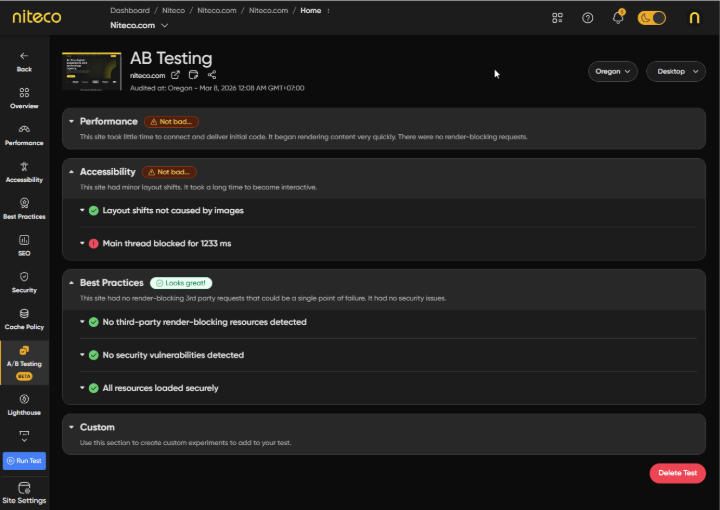
The AB Testing tab inside a Niteco Performance Insights page report.
Opening the AB Testing tab and reviewing suggestions
From a page report, select the AB Testing tab in the left sidebar (currently marked Beta). Niteco Performance Insights analyzes your selected test and generates a list of suggested optimizations, grouped into four categories: Performance, Accessibility, Best Practices, and Custom. Each category carries its own grade and a set of expandable issues, so you can see exactly what's being flagged, such as CSS files blocking page render (2 files) or Inadequate cache settings (10 files), before deciding whether it's worth testing.
Running the control and experiment tests
Pick the suggestions you want to try and hit Run Test. That queues two tests at once: a control test that leaves the page exactly as it is, and an experiment test with your selected changes applied. Both run under the same device and location settings you already had configured, so device type and test location aren't variables muddying the comparison. The only thing that changed is what you selected.
Reading the Compare view
When both tests finish, a compare session opens automatically with the two results side by side. Lighthouse scores, Web Vitals, and the rest of the metrics from the control and the experiment sit next to each other, so the effect of your change is immediately visible. If the experiment comes out ahead, you have evidence to justify the change in your actual source code. If it doesn't, you've ruled out a theory without shipping anything.
Tip: Change one variable per test run. Selecting five suggestions at once and seeing a 15-point jump tells you the combination worked, not which of the five did the work.
What Can You Test With AB Testing?
The suggestions aren't generic advice pulled from a checklist. They come from analyzing the actual page you selected, which is why the list changes from page to page.
Performance suggestions
- Lazy load images: adds loading="lazy" to images below the fold, so the browser only loads them as the user scrolls down to them.
- Defer or async scripts: stops scripts from blocking the main thread while the rest of the page renders.
- Font handling: self-host third-party fonts, add preconnect hints, or preload font files to cut the overhead of pulling them from an external domain.
- Block a specific script: target one script, like an analytics or ad tag, on its own so you can measure exactly what that one file costs the page instead of guessing.
A Performance suggestion list generated for a real page test.
Accessibility and Best Practices suggestions
The same page analysis surfaces fixes from the Accessibility and Best Practices audits, graded the same way as Performance. That means you can test insufficient colour contrast on CTA test for example, and see its effect on the score before it goes anywhere near production.
Custom experiments
The Custom category is where AB Testing goes beyond one-click suggestions:
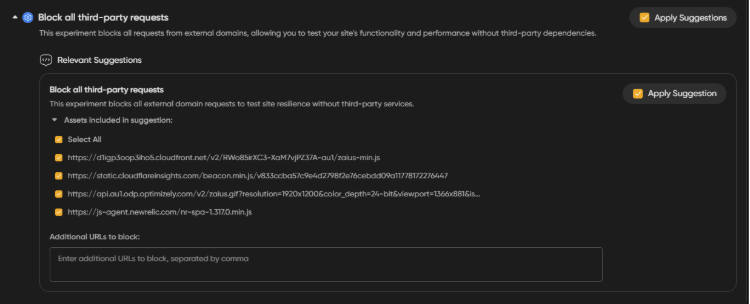
- Block all third-party requests: runs the page with every external script and resource removed, so you can see how it performs with zero third-party dependencies. If the experiment version is dramatically faster, third-party code is a real chunk of your load time and you know where to focus next.
- Content and response operations: insert content, run a find/replace, or edit the response HTML directly, for testing changes that go beyond scripts and assets.
|
Category |
What it tests |
Example suggestion |
|
Performance |
Load-time issues on the page |
Lazy-load below-the-fold images |
|
Accessibility |
Issues from the accessibility audit |
Fixes tied to layout shift or main-thread blocking |
|
Best Practices |
Security and resource-loading issues |
Removing render-blocking third-party resources |
|
Custom |
Broader experiments and manual edits |
Block all third-party requests; find/replace on response HTML |
Why Test a Change Before You Ship It?
Editing source code to test a theory carries real cost: a developer has to make the change, a reviewer has to approve it, and someone has to deploy it to staging before anyone finds out if the theory was even right. If it wasn't, that whole cycle gets reverted. AB Testing removes the two most expensive steps, the code change and the deploy, and leaves you with just the finding.
Here's what that looked like on a real test. A team ran AB Testing against Niteco.com's homepage, tested from Australia on desktop, using the Block all third-party requests experiment:
|
Score |
Test 1 (control) |
Test 2 (experiment) |
Change |
|
Performance |
77 |
92 |
+19.5% increase |
|
Accessibility |
91 |
91 |
No change |
|
Best Practices |
52 |
78 |
+50% |
|
SEO |
100 |
100 |
No change |
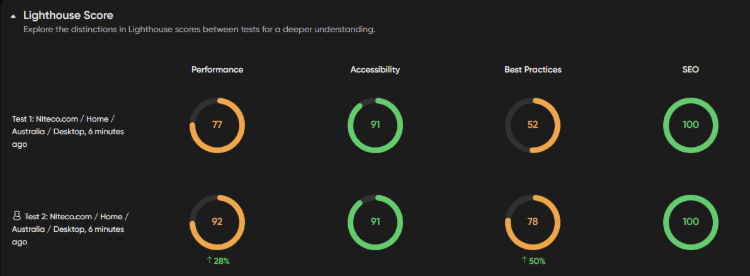
Lighthouse scores for the control test and the block-third-party-requests experiment, side by side.
Removing third-party requests moved Performance and Best Practices meaningfully without touching Accessibility or SEO, which is exactly the kind of isolated signal that's hard to get any other way. Nobody had to strip a tracking script out of production to learn that third-party code was worth investigating on that page. And if the scores had barely moved, that's a useful finding too: it means the bottleneck is somewhere else, and the team can stop looking at third-party scripts and move on.
How Do You Read the Results?
Lighthouse scores side by side
The compare view puts Performance, Accessibility, Best Practices, and SEO scores from both tests next to each other, along with the underlying Web Vitals. A jump in one category with the others holding steady, like the Best Practices example above, tells you the change was isolated to what you expected it to affect.
When the numbers barely move
A flat result isn't a failed test. If blocking every third-party script only moves Performance a few points, your bottleneck is more likely in your own assets, server response time, or render-blocking CSS, and the suggestions list under Performance is the next place to look.
Does AB Testing Work Across Regions and Devices?
If you're running one storefront from one office, this matters less. If you manage several regional domains or brands from a single team, it matters a lot. Niteco Performance Insights tests from 23 locations, and a control-versus-experiment run uses whatever device and location settings your original test was already configured with. That means a team validating a fix for their Australian storefront can run the comparison from Australia on the device their Australian customers actually use, instead of trusting a result generated from wherever the team happens to be sitting.
The tradeoff is that each region and device combination needs its own test. A Block all third-party requests result from your Australia desktop test doesn't carry over to your UK mobile experience automatically. The third-party scripts, CDN routing, and even the CSS delivery can differ enough between regions that the same experiment is worth re-running per site. For a team managing a handful of country domains, that's a small amount of repeated setup in exchange for a result that actually reflects each market rather than an average across all of them.
What Doesn't AB Testing Tell You?
AB Testing is a lab measurement, and being clear about what that means is what makes the feature useful rather than misleading.
- It's synthetic, not real user data. Niteco Performance Insights does not include Real User Monitoring, so AB Testing results reflect a controlled test run under the device and location you selected, not what actually happened to visitors on their own networks and devices.
- One page, one condition, at a time. A result from your homepage tested on desktop from Australia doesn't tell you what the same change does on a product page, on mobile, or tested from a different region. Each combination needs its own test.
- A better score isn't a guaranteed conversion lift. Fixing what AB Testing flags removes friction that was likely costing you some visitors. It's a different and more honest claim than promising the change will directly increase conversions or revenue.
- It's in beta. The feature is still being built out, so expect the suggestion list and experiment types to keep expanding.
Summary
AB Testing lets you try a change, measure it against an unmodified control, and see the real before-and-after before anyone touches your source code. That's the entire value of the feature: it turns "we think this script is slowing us down" into a number you can act on.
If you're carrying legacy analytics, ad, or personalization scripts you've never had the appetite to remove, start there. Open a page report in Niteco Performance Insights, go to the AB Testing tab, and run the Block all third-party requests experiment against your highest-traffic page. You'll have a real answer within one test cycle, not a sprint.
Don't have an account yet? Set up a free trial at insights.niteco.com and read the full documentation at perfdocs.niteco.com/docs/ab-testing.
FAQ
What is AB Testing in Niteco Performance Insights?
It's a feature that lets you apply suggested optimizations, or custom experiments like blocking third-party requests, to a page and compare the result against an unmodified control test, without changing your live source code.
Does AB Testing change my live website?
No. AB Testing runs against a test instance of the page. The control and experiment tests are both synthetic test runs; nothing is deployed or altered on your production site.
What's the difference between the control test and the experiment test?
The control test runs the page exactly as it currently is. The experiment test runs the same page with the optimizations or custom experiments you selected applied. Both run under the same device and location settings so the comparison isolates your change.
Can I test more than one optimization at a time?
Yes, you can select multiple suggestions in a single experiment test. Keep in mind that testing several changes together shows you their combined effect, not which individual change made the difference. Test one at a time if you need to isolate a specific script or asset.
Does AB Testing replace staging environments or manual QA?
No. It answers a performance and score question quickly, before you invest in a code change. Functional testing, visual QA, and staging review still matter once you decide to implement a change for real.
Is AB Testing available now?
Yes, it's accessible from the AB Testing tab on any page report in Niteco Performance Insights. It's currently marked as a beta feature, so expect ongoing changes to the suggestion list and experiment types.
Does AB Testing measure how real visitors experience my site?
No. It's synthetic lab testing, not Real User Monitoring. Results reflect the specific device and location conditions of the test, not the range of conditions your actual visitors browse under.