


An SSL certificate expiration took down a $40M/Year site for 6 hours


In 2023, a major e-commerce platform generating approximately $40 million per year in revenue went dark for six hours. Not because of a cyberattack. Not because of a server failure. Because nobody noticed an SSL certificate had expired.
Six hours offline. Every transaction blocked. Every visitor turned away by a browser security warning. Entirely preventable.
SSL certificate expiration is not a rare edge case. It happens to large, well-resourced organisations with experienced technical teams. It happens because certificate management is repetitive, easy to defer, and simple to overlook in the noise of a busy infrastructure operation. It is also, to be direct, a systems failure. Not a human one.
This post covers what happens when an SSL certificate lapses, what a solid monitoring checklist looks like, and how organisations running enterprise CMS sites can get ahead of this category of risk entirely.
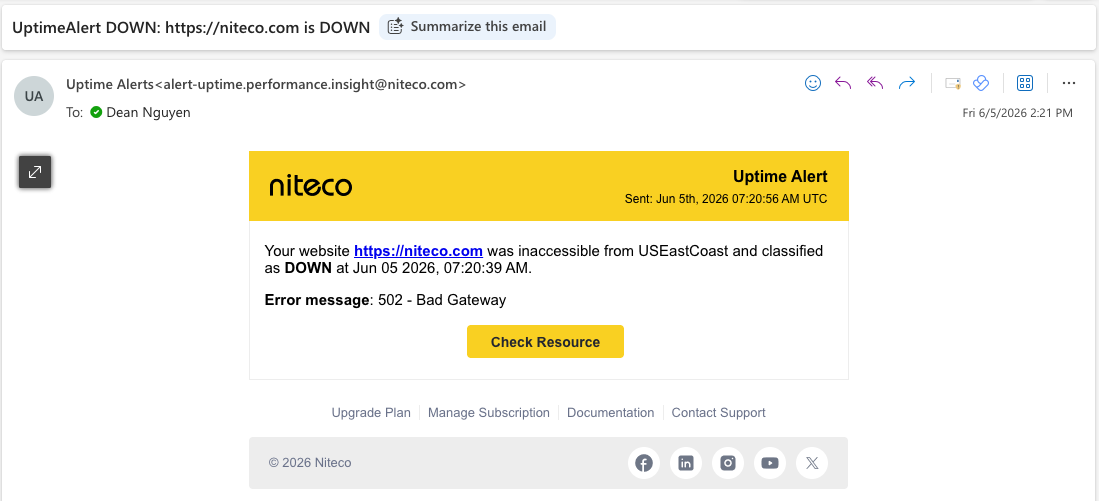
Is your team receiving downtime notifications like these?
What actually happens when an SSL certificate expires
An expired SSL certificate does not quietly degrade your site's performance. It takes it offline, immediately and completely, from the perspective of most visitors.
Modern browsers treat an expired certificate as a security threat. Chrome, Firefox, Safari, and Edge will display a full-screen warning blocking access before the user ever reaches your site. For most users, that is the end of the session.
The downstream consequences extend well beyond lost transactions:
Revenue loss is immediate. A site generating $40M per year produces roughly $4,500 per hour. Six hours is a $27,000 floor, assuming perfectly even distribution. In practice, if that window covers peak trading hours, the figure is higher.
SEO is affected. Search engines crawl SSL status. A certificate error can trigger crawling issues, indexation problems, and ranking drops that outlast the outage itself.
Payment processing stops. Most payment gateways require a valid SSL chain. Transactions do not fail gracefully; they do not process at all.
User trust erodes. A significant portion of users who encounter a browser security warning do not return, even after the issue is resolved. Research from Google's Safe Browsing team consistently shows that security warnings produce high and lasting abandonment rates.
Reputational damage with enterprise clients. For B2B sites, an outage of this kind signals infrastructure immaturity. That perception is difficult to walk back in a sales cycle.
Niteco Performance Insights lets teams get alerted to downtime across multiple countries and regions.
The SSL monitoring checklist
1. Automated certificate monitoring
Manual calendar reminders are not a monitoring strategy. They are a workaround, and they fail the moment the person who set them is unavailable.
A proper setup uses automated tools that check certificate validity continuously. These tools should track:
- Expiration date for every certificate in scope, including sub-domains
- Certificate chain integrity (not just the end-entity certificate)
- Validity of intermediate certificates
- TLS version and cipher suite health
External uptime monitors, dedicated SSL monitoring services (such as Pingdom, UptimeRobot, or SSL Labs' API integrations), and cloud provider native tools all provide this capability. The key is that monitoring must be external, not just an internal health check. If your server goes down, an internal check goes down with it.
2. Multi-stage alerting at defined intervals
A single alert at seven days is not enough headroom for an enterprise site. Certificate renewal requires coordination between security, DevOps, and sometimes third-party vendors. Build in room for delays.
Recommended alert triggers:
- 90 days before expiry: visibility-level notification to the ownership team
- 60 days: action-required alert with renewal task created and assigned
- 30 days: escalation to manager or team lead
- 7 days: urgent alert to primary and secondary contacts simultaneously
- 1 day: critical alert, all channels
Alert delivery should not rely on a single channel. Email, Slack or Teams, PagerDuty or equivalent, and SMS for critical thresholds ensures the alert reaches someone regardless of which system they are actively using.
3. Clear ownership with named individuals
"The team is responsible" means nobody is responsible. Every certificate in your estate should have a named primary owner and a named secondary contact. These individuals need to be reachable and technically capable of completing renewal. Document this, and review it when team composition changes.
4. A standardised renewal procedure
A checklist is only as good as the process it feeds into. Document the full renewal procedure step by step, and keep that documentation current. This should include:
- Which certificate authority is in use and how to access it
- How to generate and submit a certificate signing request (CSR)
- Where certificates and private keys are stored (a secrets manager or certificate management platform, not a shared drive)
- How to deploy the renewed certificate to the relevant environments, including staging
- A post-renewal validation step confirming the chain is clean and the certificate is live
5. Regular audits of the full certificate estate
Many organisations have certificates they have forgotten about. Subdomains, legacy environments, staging instances, and third-party integrations can all carry certificates. An audit should map every certificate in scope, its expiry date, its owner, and whether it is still in active use.
Audit the monitoring setup itself at the same time. Confirm that alerts are firing correctly by testing them in a controlled way.
6. Wildcard and multi-domain certificates
These require specific attention. A wildcard certificate covers all subdomains of a given domain. If it expires, every subdomain goes down simultaneously. Multi-domain (SAN) certificates carry multiple hostnames. The same expiry event can take out several distinct properties at once.
The monitoring approach does not change, but the risk profile is higher. Escalation timelines should reflect that.
What this looks like in practice: Performance Insights
Proactive monitoring changes the nature of the problem. Instead of reacting to a browser error at 11pm, your team receives a notification 60 days in advance, creates a renewal task, and closes it before the expiry window becomes a threat.
Implementing your checklist: where to start
The checklist above is not complex to implement. The challenge is consistency over time. Start with a full audit of your current certificate estate. Map every domain and subdomain, their expiry dates, and who currently owns each. That audit will tell you how exposed you are right now.
From there, set up automated monitoring with external checks, layer in the alerting thresholds, and document the renewal process once so it can be followed by anyone on the team.
If you are running an enterprise CMS environment, whether on Optimizely, Sitecore, or another platform, and your current managed services arrangement does not include proactive certificate monitoring, that is a gap worth addressing.
Conclusion
An expired SSL certificate is not a technical inevitability. It is a process failure. The site that went offline for six hours did not have bad engineers. It had a process that depended on someone remembering something that should have been automated.
Proactive monitoring, clear ownership, and a documented renewal process eliminate this risk category entirely. The checklist above gives you the structure. The question is whether you implement it before or after your own outage.