


Test your site across 20+ locations

Why your site feels fast at HQ
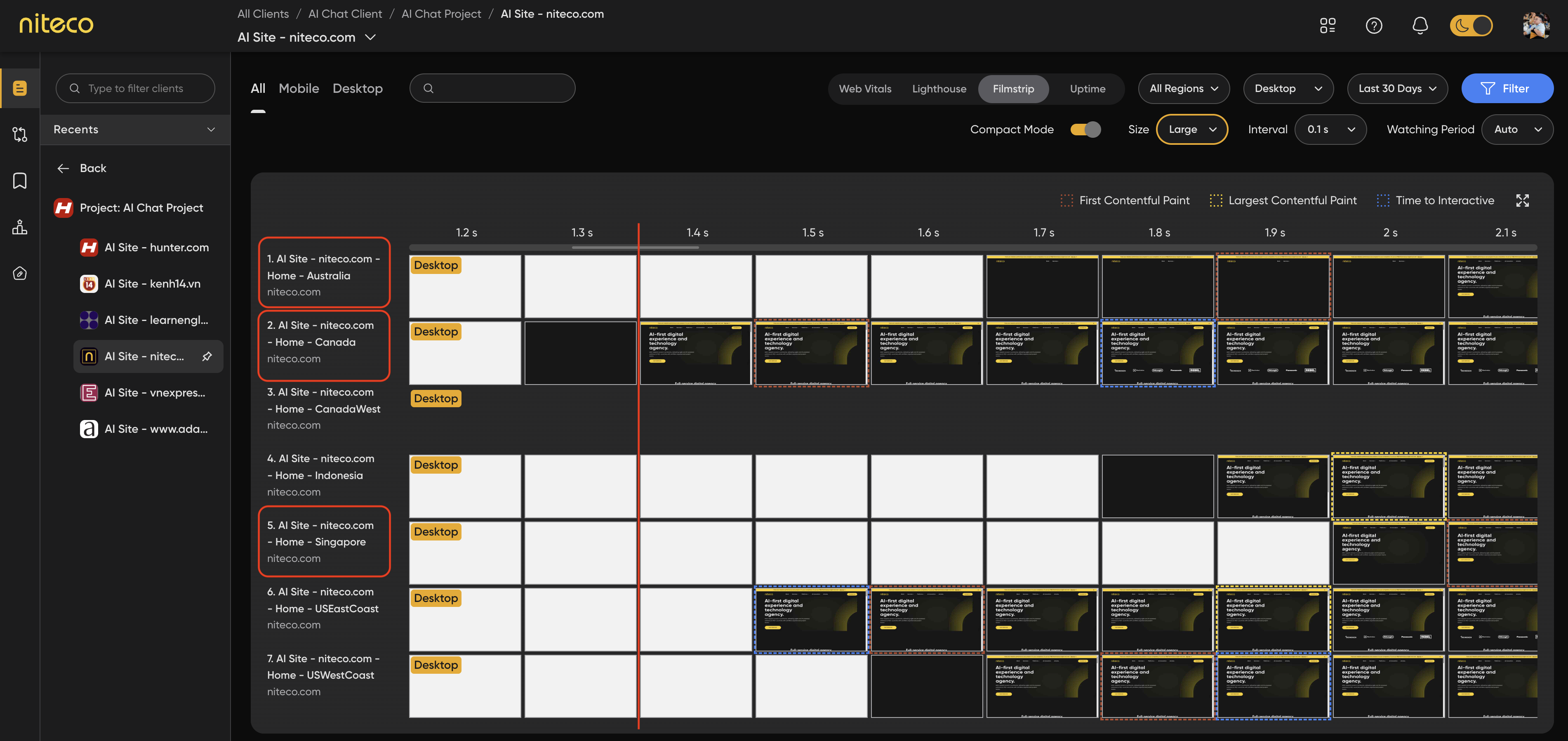
When you test from the office, you're testing under near-perfect conditions. You're often close to your origin server or CDN edge. Your network is fast and uncongested. Your browser has cached assets from the last fifty times you loaded the page. DNS is already resolved.
None of that reflects a first-time visitor two continents away. You're measuring the best case and assuming it's the average. That assumption is where the trouble starts.
What actually slows things down for remote users
Distance is physics. Data crossing from a server in Frankfurt to a device in Jakarta has to travel that distance and back for every round trip, and latency stacks up fast on a page that makes dozens of requests. A 200ms round trip feels fine once. Multiply it across a handshake, redirects, and serial asset loads, and you have seconds of delay before anything renders.
Routing makes it worse. Two users the same distance from your server can get very different speeds depending on how their ISP routes traffic and where the peering points sit. Southeast Asian routes in particular sometimes hop through other regions before reaching your origin.
Then there's your CDN. A CDN only helps where it has well-provisioned edge nodes and where your content is actually cached at those nodes. Coverage in North America and Western Europe is often dense. Coverage and cache-hit rates in parts of Asia, Africa, and South America can be thinner, which means more requests fall back to a distant origin.
Local conditions add the last layer: mobile-heavy markets, variable network quality, and lower-powered devices that take longer to parse and render whatever you send.
Why a single test location hides all of this
Most teams run synthetic tests from one place, usually wherever the tooling defaults to or wherever the team sits. A single-location test gives you one data point that happens to look good. It can't show you that LCP is 2.1 seconds in London and 7.4 seconds in Singapore, because it never tested Singapore.
This is the core limit. You can't fix a regional problem you've never measured.
The 23-location test
The fix is straightforward in principle: test from many places, not one. Performance Insights runs synthetic tests across regions, so you see the same page measured from multiple points instead of a single optimistic reading.
What you're looking for across those locations:
TTFB (Time to First Byte) tells you how long the server and network take before content starts arriving. A low TTFB at HQ and a high one in another region usually points at routing or CDN gaps rather than your application code.
LCP (Largest Contentful Paint) shows when the main content becomes visible. Wide variation between regions is the clearest signal that location, not code, is the bottleneck.
TBT (Total Blocking Time) reflects how much heavy scripting blocks interaction, which tends to hit lower-powered devices harder.
The network waterfall shows you request by request where the time goes, so a slow region stops being a vague complaint and becomes a specific asset or request you can act on.
What this won't tell you
Synthetic multi-location testing measures performance under controlled conditions from fixed points. It is not real user monitoring. It won't capture the exact device, network, and behavior of every actual visitor, and Performance Insights doesn't do RUM. What it does well is catch regional problems repeatably, before customers report them, which is usually where the unknown failures hide.
What it costs the business
Slow regional performance shows up as higher bounce rates and lost conversions in exactly the markets you're trying to grow. Page experience also feeds search ranking, so a region that loads poorly can rank worse there. And first impressions stick: a visitor who waits seven seconds rarely comes back to check if you fixed it.
Where to start
Pick your real markets, not just your headquarters, and measure them on a schedule rather than once. Compare TTFB and LCP region by region to separate network problems from code problems. Where a CDN is underperforming in a specific area, that's a configuration conversation worth having. Some teams also look at edge strategies for genuinely global audiences, though that's a larger architectural decision.
If you want to see how your storefronts actually perform outside the HQ bubble, Niteco Performance Insights is a practical place to start measuring across your whole estate from one dashboard