


Understanding Agentic Browsing and How to Track It Using Lighthouse


Lighthouse has a new category called Agentic Browsing. It measures how well your site can be understood and operated by an AI agent rather than a person, and it now sits alongside Performance, Accessibility, Best Practices and SEO in the report. Niteco Performance Insights tracks it from today; on every page and every location you already monitor.
This guide covers:
- What agentic browsing means and how agents actually read a page
- The specific checks inside the Lighthouse Agentic Browsing category
- Why the score is a fraction instead of a number out of 100
- What the data says about AI-sourced traffic, and what it does not say
- How to track the category over time across multiple sites and regions
What is agentic browsing?
Agentic browsing is a browser session driven by software instead of a person. An AI agent opens a page, works out what is on it, and then carries out a task: comparing two products, filling in a booking form, pulling a delivery date out of an order tracker, adding an item to a cart. The agent is not reading your page the way a shopper does. It has no eye for a well-designed hero image and no patience for a layout it has to guess at. It builds a model of the page from structure, then acts on that model.
How an agent reads a page
Three inputs do most of the work.
- The accessibility tree: This is the browser's structured description of the page: roles, names, states, parent-child relationships. Chrome's documentation describes it as an agent's primary data model for identifying interactive elements.
- Element position: Agents often work from screenshots or coordinates. If a button moves between the moment the agent locates it and the moment it clicks, the click lands somewhere else.
- Declared capabilities: Newer sites can tell an agent directly what they can do through WebMCP, rather than leaving the agent to infer it from the DOM.
An unlabelled icon button that a sighted user reads instantly from context is, to an agent, an element with a role and no name. It may still guess correctly. It may not.
How this differs from SEO
SEO asks whether a crawler can find and index your content. Agentic readiness asks whether an agent can complete a task on your page. Those are related but not the same. A page can rank well and still be impossible to operate, because ranking depends on content and links while task completion depends on structure, labelling and stability.
Note: Agentic browsing readiness is not a replacement for SEO work. It is a second surface, and it fails in different ways.
Why does agentic browsing matter now?
Because the traffic is already arriving, and it converts.
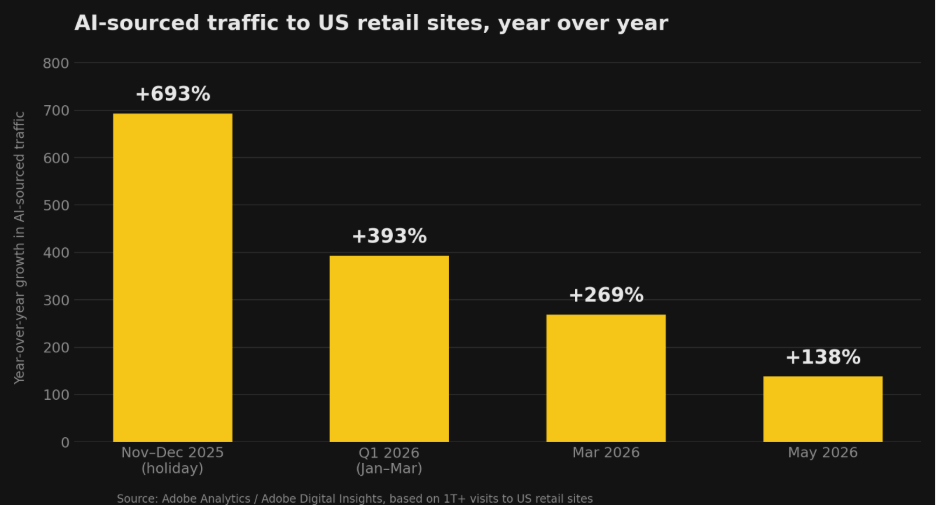
Adobe, drawing on more than one trillion visits to US retail sites, reported that traffic from AI sources grew 393% year over year across the first quarter of 2026, following a 693% year-over-year jump during the November to December 2025 holiday period. Later Adobe data put May 2026 growth at 138% year over year, and cumulative growth since October 2024 at more than fourteen times.
The quality of that traffic changed too. In March 2026, visits from AI sources converted 42% better than non-AI traffic, a record high for Adobe's series. A year earlier, in March 2025, the same traffic converted 38% worse. Engagement moved with it: 12% higher engagement rate, 48% longer time on site, 13% more pages per visit compared with non-AI traffic.
Most sites are not ready for it
Adobe also benchmarked how much page content machines can actually read, using its AI Content Visibility Checker across the US retail sector. Homepages averaged 75%. Category pages came in at 74%. Product pages, the ones that carry the SKUs, scored 66%.
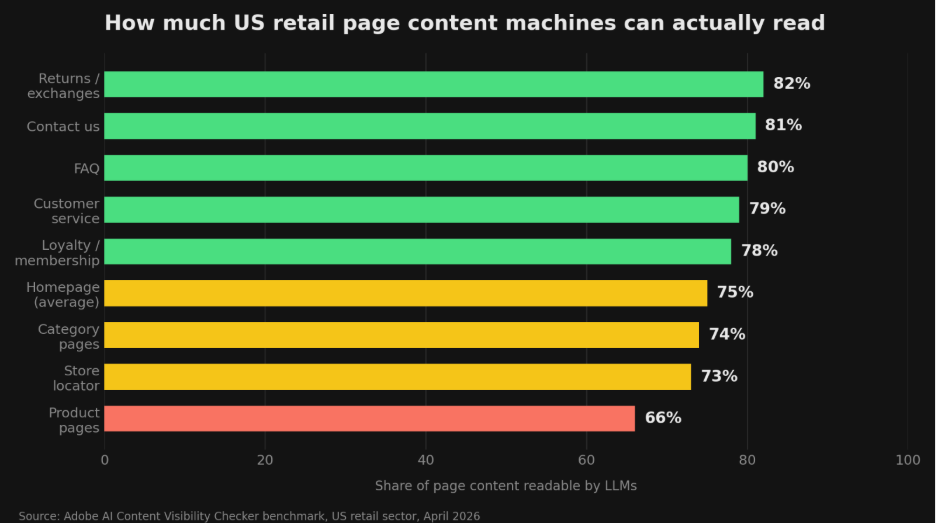
Roughly a third of product page content in that benchmark is invisible to the machines that are now sending your best-converting traffic. The gap between the strongest and weakest retail homepages was wide as well: 82.5% against 54.2%.
That is the case for measuring this. Not because a Lighthouse category is inherently interesting, but because the readiness gap is real, uneven, and currently unmeasured on most sites.
What does Lighthouse check in the Agentic Browsing category?
The category runs a set of deterministic audits, which means the same page in the same state produces the same result. That is what makes it usable in a monitoring tool or a CI pipeline. The audits fall into four groups.
|
Group |
What it checks |
Failure mode for an agent |
|
WebMCP integration |
Registered tools, form annotations, schema validity |
Agent has to infer what a form does |
|
Agent-centric accessibility |
Names, labels, tree integrity, visibility |
Agent cannot identify the right element |
|
Layout stability |
Cumulative Layout Shift |
Agent clicks where the button used to be |
|
Discoverability |
llms.txt at the domain root |
Agent spends longer working out site structure |
WebMCP integration
WebMCP lets a page declare its capabilities to an agent explicitly. Lighthouse calls the Chrome DevTools Protocol WebMCP domain to watch tool registration and reports three things.
- Registered WebMCP tools. Informational. Lists every tool the page registers, whether declaratively in HTML or imperatively through document.modelContext.registerTool.
- Forms missing declarative WebMCP. Informational. Flags <form> elements without both a toolname and a tooldescription.
- WebMCP schema validity. This one can fail. It fails when a form has a tooldescription but no toolname, when it has a toolname but no tooldescription, or when a required field is missing a name attribute.
A declared tool looks like this:
<form toolname="newsletter_signup" tooldescription="Subscribes the user to the weekly newsletter">
<input name="email" type="email" toolparamdescription="The user's email address">
<button type="submit">Sign Up</button>
</form>
WebMCP is experimental. The audits require Chrome 150 or later, and picking up WebMCP signals requires registering for the WebMCP origin trial. If your site does not use WebMCP, these three audits report as Not applicable, which Lighthouse does not treat as a failure. In the dashboard screenshot below, that is exactly what a clean, non-WebMCP site looks like: three Not applicable rows, no issues.
Agent-centric accessibility
Lighthouse filters its existing accessibility audits down to the subset that matters for machine interaction: programmatic names on interactive elements, valid roles and parent-child relationships, and content that is not hidden from the accessibility tree while remaining interactive.
This is the group most teams can act on immediately, because the fixes are ordinary semantic HTML and ARIA work. It also has a useful side effect, since the same changes help people using screen readers.
Layout stability
The category reuses Cumulative Layout Shift, but the reason for caring is different. For a human, a shifting layout is annoying. For an agent working from coordinates, a shift between identification and interaction means the click misses. Ads, images without dimensions and injected content are the usual causes.
Discoverability with llms.txt
llms.txt is an emerging convention: a Markdown summary of your site's purpose and key links, placed at the domain root. Lighthouse flags a failure only if the server errors when the file is requested. A 404 marks the audit Not applicable, because providing the file is optional right now.
How is the Agentic Browsing category scored?
Unlike the other four categories, there is no weighted average out of 100. Chrome's reasoning is that the standards for the agentic web are still forming, so the goal is to gather data and give actionable signals rather than hand out a ranking.
What you get instead:
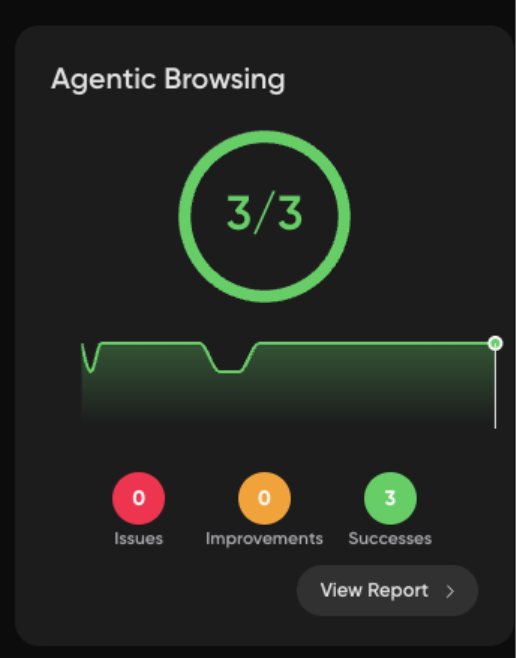
- A fractional score, such as 3/3, showing how many readiness checks the page passes
- Pass or fail status on individual audits, with errors or warnings where a technical requirement like schema validity is not met
- Informational counts in the category header
So a 3/3 does not mean your site is fully agent-ready. It means every applicable check passed. On a site with no WebMCP implementation, that fraction is drawn from a smaller pool of applicable audits than on a site that has adopted it.
Why results move between runs
The audits are deterministic, but the page state is not always. Chrome names three common causes of fluctuation:
- Tools registered through the imperative JavaScript API may or may not be captured, depending on registration timing against the Lighthouse snapshot
- Large changes to DOM size or complexity alter the accessibility tree
- CLS varies with ads, late-loading images and injected content
This is the argument for trended data rather than one-off audits. A single 2/3 tells you very little. A 3/3 that drops to 2/3 on the day of a template change tells you where to look.
What agentic browsing tracking will not tell you
Worth being direct about the limits, because there are several.
The category does not tell you whether real agents succeed on your site. These are lab audits run on a synthetic page load. They measure whether the conditions for reliable agent interaction are present, not whether an agent completed a checkout. Nothing in Lighthouse, and nothing in Niteco Performance Insights, measures live agent sessions.
A fractional score is also not comparable across sites in the way a Performance score is. Two sites both showing 3/3 may have been assessed against different sets of applicable audits.
And the category is explicitly experimental. Audit definitions may change, WebMCP is still an origin trial, and the meaning of any given number may shift between Lighthouse releases. Treat the trend line as a change detector rather than a certificate.
Niteco Performance Insights has its own boundaries here. It runs synthetic Lighthouse audits, not Real User Monitoring, so it cannot show you what real visitors or real agents experienced on your live site. It offers custom CPU or network throttling if you need to model unusual device conditions.
Tip: Use the fractional score as a regression alarm on templates, not as a KPI to report upward. The value is in the day it changes.
How do you improve your agentic browsing score?
Chrome's guidance comes down to three moves, and the order matters for most teams.
- Fix the accessibility tree first. Semantic HTML, programmatic names on every interactive element, valid roles, nothing interactive hidden from the tree. Cheapest work, largest immediate effect, and it improves your Accessibility score at the same time.
- Reduce layout shift. Set explicit dimensions on images and embeds, reserve space for ads and injected content, avoid inserting content above existing content after load.
- Adopt WebMCP where a task matters. Start with the forms that carry real intent: search, add to cart, booking, newsletter signup, contact. Give each a clear action-oriented toolname, a description that explains when an agent should use it, a name on every input, and a toolparamdescription where the expected value is not obvious.
Adding llms.txt is a small, low-risk fourth step. It is optional today, and its absence does not count against you.
Why track agentic browsing in Niteco Performance Insights?
Running Lighthouse once in Chrome DevTools tells you the state of one page, on one machine, at one moment. That is fine for a spot check and close to useless for a web estate.
Niteco Performance Insights runs the Agentic Browsing category as part of scheduled audits across the pages you already monitor, on desktop and mobile, from any of 23 test locations. The fractional score is stored with every run, so the category gets the same trend chart, history and per-page breakdown as Performance, Accessibility, Best Practices and SEO. The screenshot below shows a 3/3 result plotted over three weeks, with two dips visible where the score fell to 2 before recovering.

Three things follow from that.
You see regressions on the day they ship. A template change that strips a label off a button, or a new promo banner that reintroduces layout shift, shows up as a drop in the fraction against a known-good baseline. Without history, the same regression is invisible until someone happens to run an audit.
You see it across every site, brand and country domain. The multi-client model applies from the entry tier, so a team managing a dozen storefronts gets one dashboard covering all of them rather than a dozen separate manual checks. Agentic readiness tends to be a template-level property, which means one shared component regression can hit every storefront at once.
You see it per region. Because audits run from 23 locations, you can check whether a market on a different CDN edge, a localised template or a regionally injected consent banner produces a different result from your primary market.
The category also sits next to signals that indicate the same page for entirely different reasons. Uptime monitoring, SSL monitoring and the site map check will not tell you anything about agent readiness. But a page that agents cannot reach at all is a more urgent problem than a page they cannot parse, and it makes sense to watch both in one place. Google Analytics integration adds the traffic side of the picture next to the audit data.
None of this makes your site agent-ready on its own. Monitoring surfaces the gap and tells you when it moves. Closing it is engineering work on your templates.
Summary
Agentic browsing readiness comes down to whether an agent can identify, understand and reliably click the things on your page. Lighthouse now measures that as a fraction rather than a score, the underlying signals are ordinary accessibility and layout work most teams already know how to do, and the traffic that cares about it is growing fast enough to be worth watching.
If you already run Niteco Performance Insights, the Agentic Browsing column is live on your existing monitored pages with no setup. Open the site view, compare the desktop and mobile fractions on your highest-intent templates, and check whether the WebMCP rows read Not applicable or failed. If you are not monitoring yet, start by adding your product and category templates across your main country domains, then watch the fraction over a full release cycle. That first regression is where the value shows up.
FAQ
Is agentic browsing the same thing as AI search optimisation?
No, though they overlap. AI search optimisation is about being cited and surfaced in generated answers, which depends heavily on content and machine readability. Agentic browsing readiness is about whether an agent that has already landed on your page can operate it. A page can be highly visible in AI answers and still fail at the interaction step.
Do I need to implement WebMCP to score well?
No. If your site does not use WebMCP, the three WebMCP audits report as Not applicable, which Lighthouse does not treat as a failure. You can pass the applicable checks through accessibility and layout stability alone. WebMCP makes agent interaction more reliable where you have implemented it, so it is worth considering for high-intent forms.
Why is my score a fraction and not a number out of 100?
Chrome decided against a weighted score because the standards for the agentic web are still emerging. The stated priority is gathering data and giving actionable signals rather than producing a definitive ranking. The fraction shows how many applicable readiness checks the page passed.
Why does my agentic browsing score change when I have not changed anything?
Most often it is one of three causes: JavaScript-registered WebMCP tools not being captured in the Lighthouse snapshot due to timing, changes in DOM size or complexity altering the accessibility tree, or variable layout shift from ads and injected content. Trended data across scheduled runs makes it easier to separate genuine regressions from run-to-run noise.
What browser version does this need?
The Agentic Browsing category requires Chrome 150 or later, and the WebMCP audits additionally require registration for the WebMCP origin trial. Both are documented in Chrome's scoring guide.
Does a good agentic browsing score mean AI agents can complete purchases on my site?
It does not. These are lab audits measuring whether the structural conditions for reliable interaction exist. They do not test a completed transaction, and no synthetic audit can. Treat the score as a readiness signal, not proof of task success.
Does this replace accessibility testing?
No. The Agentic Browsing category uses a filtered subset of accessibility audits chosen for machine interaction, not the full WCAG-oriented set. Passing the agentic checks does not mean your site is accessible to people. Run both.
Can I track it across multiple sites at once?
Yes. Niteco Performance Insights applies its multi-client model from the entry tier, so agentic browsing results for every site, brand or country domain you monitor appear in one dashboard alongside the other four Lighthouse categories.